
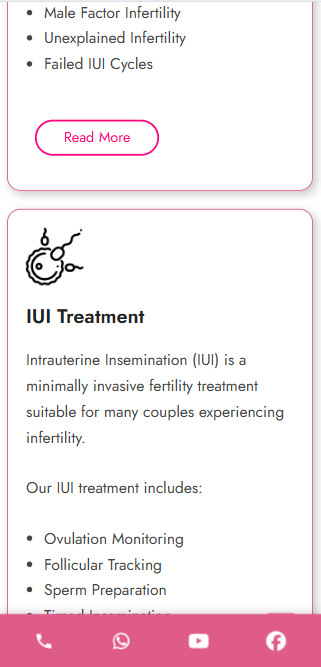
Sticky Bottom Bar – WordPress Plugin
Sticky Bottom Bar is a lightweight WordPress plugin that adds a customizable fixed bottom navigation bar to your website. Add quick-access buttons for Phone Call, WhatsApp, Appointment Booking, Instagram, LinkedIn, Email, and custom links to improve visitor engagement and make important actions easier to access.
Perfect for business websites, service providers, clinics, consultants, agencies, restaurants, eCommerce websites, and local businesses.
Key Features
-
📞 Click-to-Call Button – Let visitors call your business directly.
-
💬 WhatsApp Button – Open a WhatsApp conversation with one tap.
-
📅 Appointment / Booking Button – Connect visitors to Calendly, booking systems, or any custom URL.
-
📸 Instagram Button – Link directly to your Instagram profile.
-
💼 LinkedIn Button – Add your LinkedIn business or personal profile.
-
✉️ Email Button – Open the visitor’s default email application.
-
🖼️ Custom Icon Support – Upload your own icon image.
-
📱 Mobile & Desktop Controls – Configure the bar independently for mobile and desktop.
-
📏 Responsive Height Settings – Set different bar heights for mobile and desktop.
-
🔘 Custom Icon Size – Control icon size separately for different devices.
-
🎨 Custom Colors – Choose your preferred background and icon colors.
-
📝 Optional Text Labels – Show or hide labels below icons.
-
⚙️ Individual Icon Controls – Enable or disable each button independently.
-
📐 Custom Mobile Breakpoint – Choose when the mobile layout should apply.
-
🔗 Custom Destination Links – Set your own URL for each button.
-
🚀 Simple WordPress Admin Settings – Configure everything from the WordPress dashboard.
Why Use Sticky Bottom Bar?
Important contact and conversion options can easily get lost on mobile websites. A sticky bottom bar for WordPress keeps your most important actions visible while visitors browse your website.
Use it to increase:
-
Phone call enquiries
-
WhatsApp enquiries
-
Appointment bookings
-
Email enquiries
-
Social media visits
-
Customer engagement
-
Mobile conversions
The plugin is designed to provide a simple, responsive and user-friendly WordPress floating bottom bar without requiring complicated coding.
Perfect For
Sticky Bottom Bar can be used on almost any WordPress website, including:
-
Business websites
-
Corporate websites
-
Doctor and healthcare websites
-
Clinics and hospitals
-
Real estate websites
-
Hotels and restaurants
-
Consultants
-
Coaching institutes
-
Educational websites
-
Digital marketing agencies
-
Freelancers
-
Local businesses
-
Service-based businesses
-
eCommerce websites
Installation
-
Download the Sticky Bottom Bar WordPress Plugin ZIP.
-
Log in to your WordPress admin dashboard.
-
Go to Plugins → Add New → Upload Plugin.
-
Upload the plugin ZIP file.
-
Click Install Now.
-
Activate the plugin.
-
Open Sticky Bottom Bar from the WordPress admin menu.
-
Configure your buttons, links, colors, icon sizes and responsive settings.
-
Save your settings and visit your website to see the sticky bottom bar.
Frequently Asked Questions
How do I add a phone call button?
Enter your phone number in the Phone icon’s Value field, including the country code. For example:
+911234567890
The plugin automatically creates a clickable tel: link.
How do I add WhatsApp?
Enter your WhatsApp number with the country code in the WhatsApp Value field. For example:
911234567890
The plugin will create the WhatsApp link automatically.
Can I add an appointment booking link?
Yes. You can enter any booking URL, including Calendly, appointment systems, consultation booking pages, or your own website booking page.
Can I add my own icon?
Yes. Select Custom as the Icon Style and upload your preferred icon image through the WordPress Media Library.
Can I hide the sticky bar on desktop or mobile?
Yes. Desktop and mobile visibility can be controlled independently from the plugin settings.
Can I change the height of the bottom bar?
Yes. You can set separate sticky bar heights for desktop and mobile devices.
Can I hide the text below the icons?
Yes. The plugin includes an option to show or hide text labels under the icons.
Is the plugin responsive?
Yes. Sticky Bottom Bar includes separate settings for mobile and desktop layouts, including icon size, bar height and mobile breakpoint.
Plugin Information
Plugin Name: Sticky Bottom Bar
Version: 1.0.0
Requires WordPress: 5.5 or higher
Tested Up To: 6.6
Requires PHP: 7.2 or higher
License: GPLv2 or later